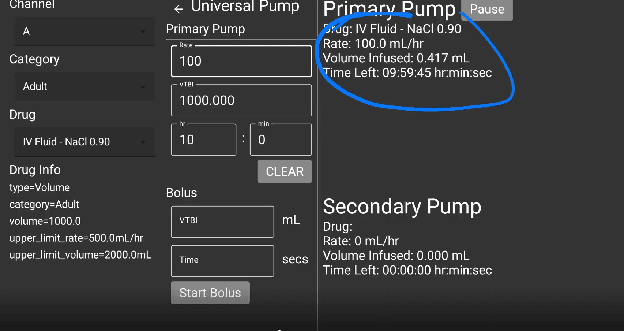
Universal Pump Interface
Step-by-step guide to operating the Universal web-style pump simulator in SimVS-IV.
The Universal pump is a web-style generic pump interface designed for tablet and browser use. Unlike the other pump simulators that replicate specific physical hardware, the Universal pump provides a clean, form-based interface with dropdown menus and text fields.
Before You Begin
Familiarize yourself with the Generic Pump Operations before using specific pump interfaces.
Interface Layout
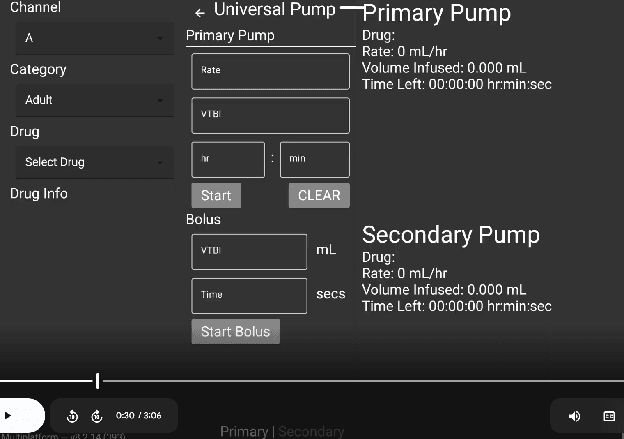
The Universal pump has a three-column layout:
- Left column — Channel, Category, Drug selectors, and Drug Info
- Center column — Primary Pump controls (Rate, VTBI, time, Start/Clear) and Bolus controls
- Right column — Real-time display for Primary Pump and Secondary Pump status
Programming an Infusion
Select Channel and Category
Use the dropdown menus on the left to select:
- Channel — A (default)
- Category — Adult, Pediatric, or PCA
- Drug — Select from the drug library
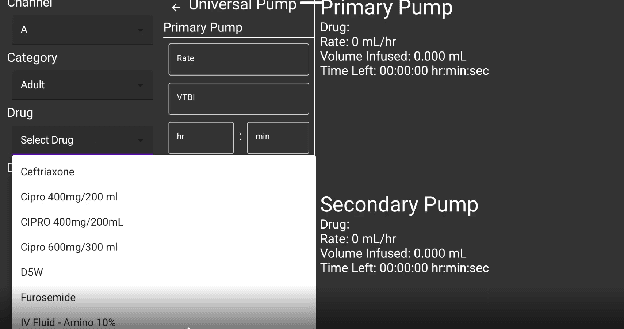
Choose a Drug
Click the Drug dropdown to see available medications. The list includes all drugs configured for the selected category.
Enter Rate and VTBI
In the Primary Pump section, enter:
- Rate — infusion rate in mL/hr
- VTBI — volume to be infused in mL
- hr : min — duration (auto-calculated or manual entry)
Press Start
Click the green Start button to begin the infusion. The CLEAR button resets all fields.
Running State
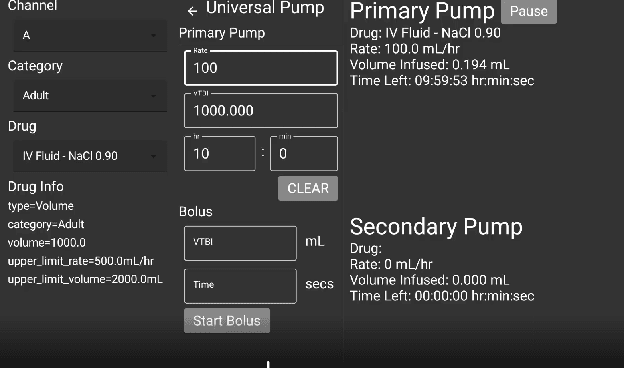
When the infusion is running, the right column displays real-time status:
- Drug name and rate (e.g., IV Fluid - NaCl 0.90 at 100.0 mL/hr)
- Volume Infused — updates in real time
- Time Left — countdown in hr:min:sec
- Pause button — to temporarily stop the infusion
The left column shows Drug Info with the drug's type, category, volume, and guardrail limits.
Bolus
The Bolus section is located below the Primary Pump controls. Enter:
- VTBI — bolus volume in mL
- Time — bolus duration in seconds
Press Start Bolus to deliver.
Secondary Pump
The Secondary Pump status is displayed in the right column below the Primary Pump. It shows the same fields (Drug, Rate, Volume Infused, Time Left) independently.