
SimVS-X Defibrillator
Guide to the SimVS-X Defibrillator interface and step-by-step procedures for defibrillation, cardioversion, and pacing.
The SimVS-X Defibrillator interface replicates a realistic defibrillator/monitor with full functionality including pacing, cardioversion, defibrillation, and 12-lead EKG.
Instructor and Simulation Technician Deep Dive
For a complete instructor-and-learner walkthrough, including device management, vital signs and waveforms, defibrillation, partial release, trending, 12-lead workflows, pacing, alarms, and checklists, watch the full deep dive.
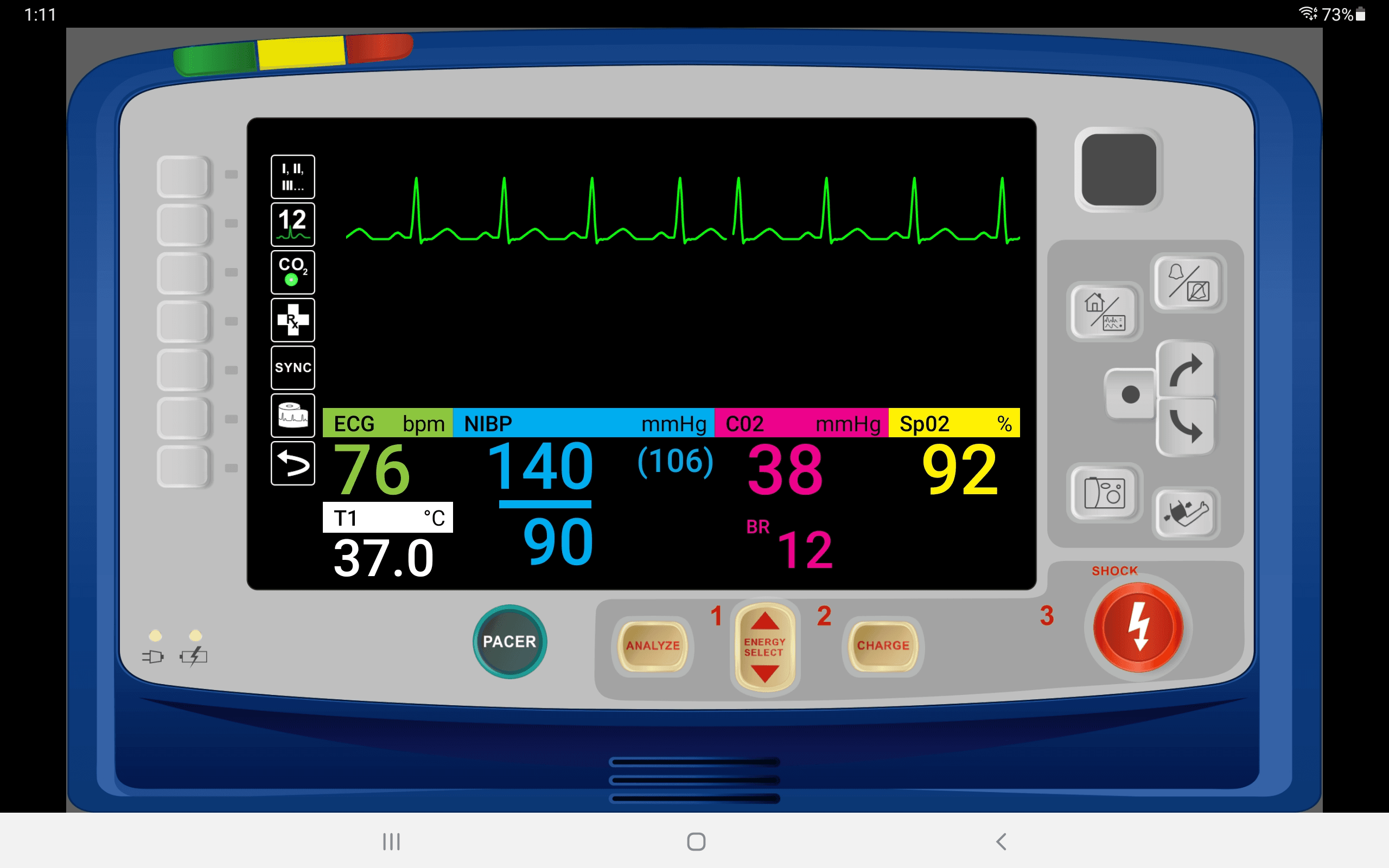
Interface Controls
The defibrillator interface is organized into labeled zones:
| Zone | Control | Description |
|---|---|---|
| A | Lead Selection | Select which ECG lead to display on the waveform |
| B | 12 Leads | Access 12-lead EKG capture and display |
| C | Capnography | Toggle capnography (CO2) waveform |
| D | Pace | Open the pacing controls |
| E | Home | Return to the main display view |
| F | Alarms | Access alarm settings and configuration |
| G | Navigation | Scroll and navigate through display options |
Vital Signs Display
The center of the screen shows numeric readouts for all monitored parameters:
- ECG — heart rate in bpm
- NIBP — non-invasive blood pressure (systolic/diastolic and MAP)
- CO2 — end-tidal CO2 in mmHg
- SpO2 — oxygen saturation percentage
- T1 — temperature in °C
- BR — breathing rate
Bottom Controls
The bottom row contains the primary defibrillation controls:
| Button | Function |
|---|---|
| PACER | Opens the external pacing interface |
| ANALYZE | Analyzes the cardiac rhythm for shockable patterns |
| ENERGY SELECT | Select energy level (1, 2, 3 settings) for defibrillation |
| CHARGE | Charges the defibrillator to the selected energy level |
| SHOCK (lightning bolt) | Delivers the defibrillation shock |
SYNC Mode
The SYNC button on the left side enables synchronized cardioversion mode. When active, the shock will be delivered in sync with the R-wave of the ECG.
Switching Display Modes
To switch to the Hospital Monitor or other display modes, use the radio buttons at the bottom of the screen.
Step-by-Step Procedures
The following walkthroughs cover the core defibrillator functions using the Cardiac Chest Pain scenario. Each procedure involves coordination between the instructor tablet and the student tablet.
Instructor & Student Coordination
Steps labeled Instructor are performed on the instructor tablet. Steps labeled Student are performed on the student-facing defibrillator display.
Starting the Defibrillator Monitor
Instructor — Select the X-Series defibrillator monitor and choose the Cardiac Chest Pain scenario.
Student — Launch the X-Series Monitor on the student tablet.
Student — Select the Pads button (first button on the upper left side) to apply pads.
Defibrillation
The patient deteriorates to ventricular fibrillation (V-Fib) as the scenario advances.
Student — Press Energy Select and confirm the appropriate charge level.
Student — Press Charge, then deliver the shock with the Shock button.
Student — Monitor the number of shocks delivered and energy levels used.
Instructor — Convert the patient to Normal Sinus Rhythm (NSR) when appropriate.
Cardioversion
Instructor — Select an SVT (supraventricular tachycardia) rhythm scenario.
Student — Apply pads and press the SYNC button (fifth button on the left side) to enable synchronized cardioversion mode.
Student — Press Energy Select and choose 120 joules (or follow local protocols).
Student — Press Charge and deliver the synchronized shock.
Instructor — Improve the patient to Normal Sinus Rhythm if required.
Pacing
Instructor — Select the Sinus Bradycardia scenario and monitor student actions.
Student — Apply pads and press the Pacer button at the bottom of the screen.
Student — Turn on the pacer using the second button from the bottom.
Instructor — Set the Pacing Capture variable to 70 on the instructor screen.
Student — Gradually increase the output until electrical capture is obtained.
Related Resources
- SimVS LP-15 Defibrillator — step-by-step procedures for the LP-15 defibrillator model
- Scenario Library — browse and launch pre-built clinical scenarios
- Creating Scenarios — create custom scenarios for defibrillator training