
Fetal Heart Monitor
Guide to the Fetal Heart Monitor interface — FHR tracing, TOCO contraction monitoring, maternal vitals, and instructor controls.
The Fetal Heart Monitor interface simulates an electronic fetal monitoring (EFM) strip chart used in labor and delivery settings. It displays a continuous fetal heart rate (FHR) tracing and tocodynamometer (TOCO) contraction pattern on a standard grid.
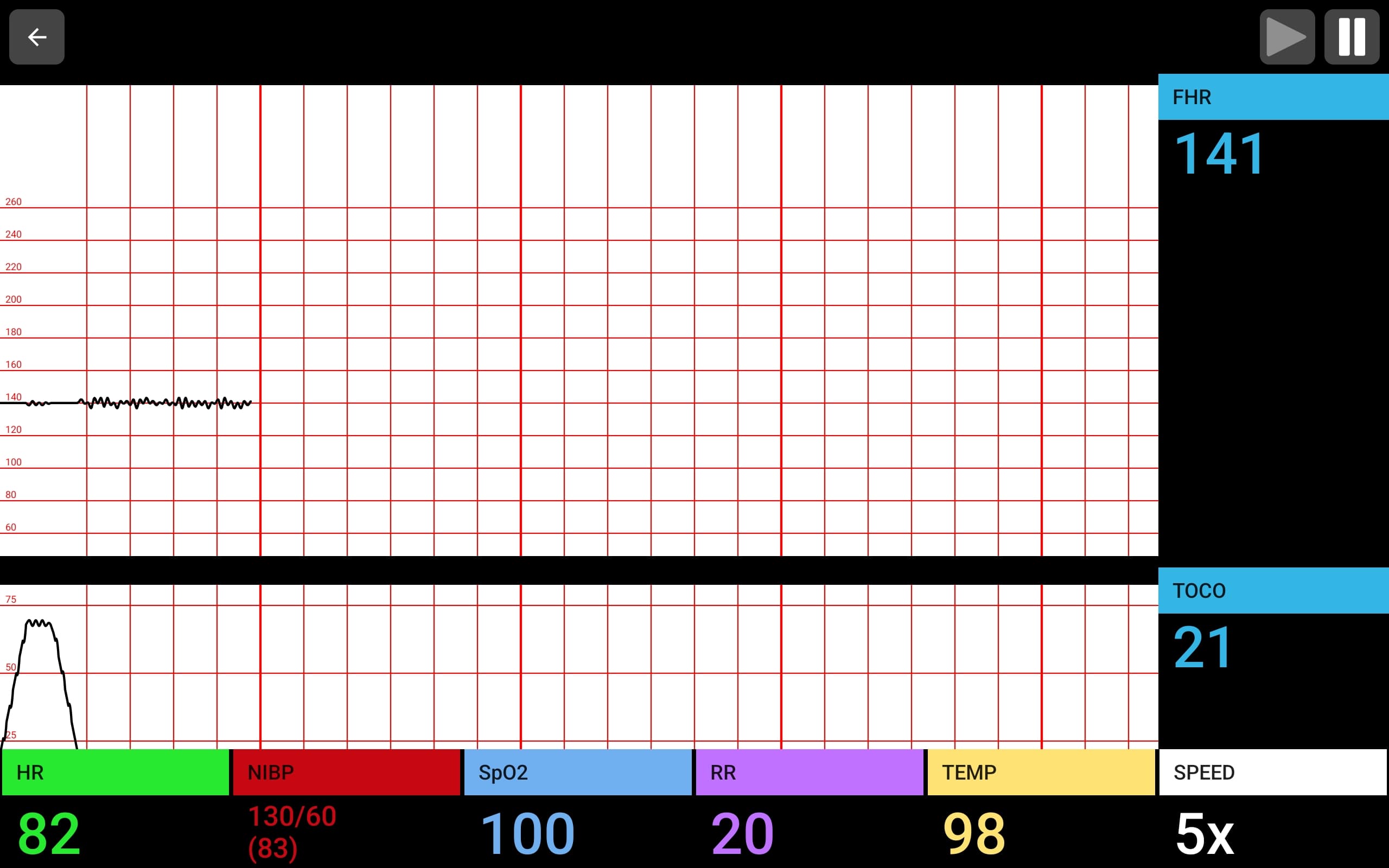
Interface Layout
The fetal monitor display is divided into several areas:
| Area | Description |
|---|---|
| FHR tracing | Upper section — fetal heart rate plotted on a standard grid scaled 60–240 bpm |
| FHR numeric | Right side, cyan — current fetal heart rate value |
| TOCO tracing | Lower section — uterine contraction pattern on a grid scaled 0–100 |
| TOCO numeric | Right side, cyan — current tocodynamometer value |
| Maternal vitals bar | Bottom row — HR (green), NIBP (red), SpO2 (white), RR (white), TEMP (purple), SPEED (yellow) |
| Playback controls | Top-right — play and pause buttons |
| Back button | Top-left — return to the main screen |
FHR Tracing
The fetal heart rate tracing scrolls from left to right on a standard EFM grid:
- Grid scale: 60–260 bpm (vertical), time-based (horizontal)
- Normal baseline: 110–160 bpm
- Variability is visible in the beat-to-beat fluctuations of the trace
- Accelerations and decelerations appear as the tracing rises above or dips below the baseline
TOCO / Contraction Monitoring
The lower tracing displays uterine activity:
- Grid scale: 0–100 units
- Contractions appear as peaks rising from the baseline
- Frequency, duration, and intensity are all controlled by the instructor
Maternal Vitals
The bottom bar displays the mother's vital signs during the simulation:
| Parameter | Color | Description |
|---|---|---|
| HR | Green | Maternal heart rate |
| NIBP | Red | Non-invasive blood pressure (systolic/diastolic with MAP) |
| SpO2 | White | Oxygen saturation (%) |
| RR | White | Respiratory rate |
| TEMP | Purple | Temperature |
| SPEED | Yellow | Chart speed multiplier (1x, 2x, 5x, 10x) |
Instructor Controls
From the instructor's live simulation view, the fetal monitor provides two parameter tabs:
OB Tab
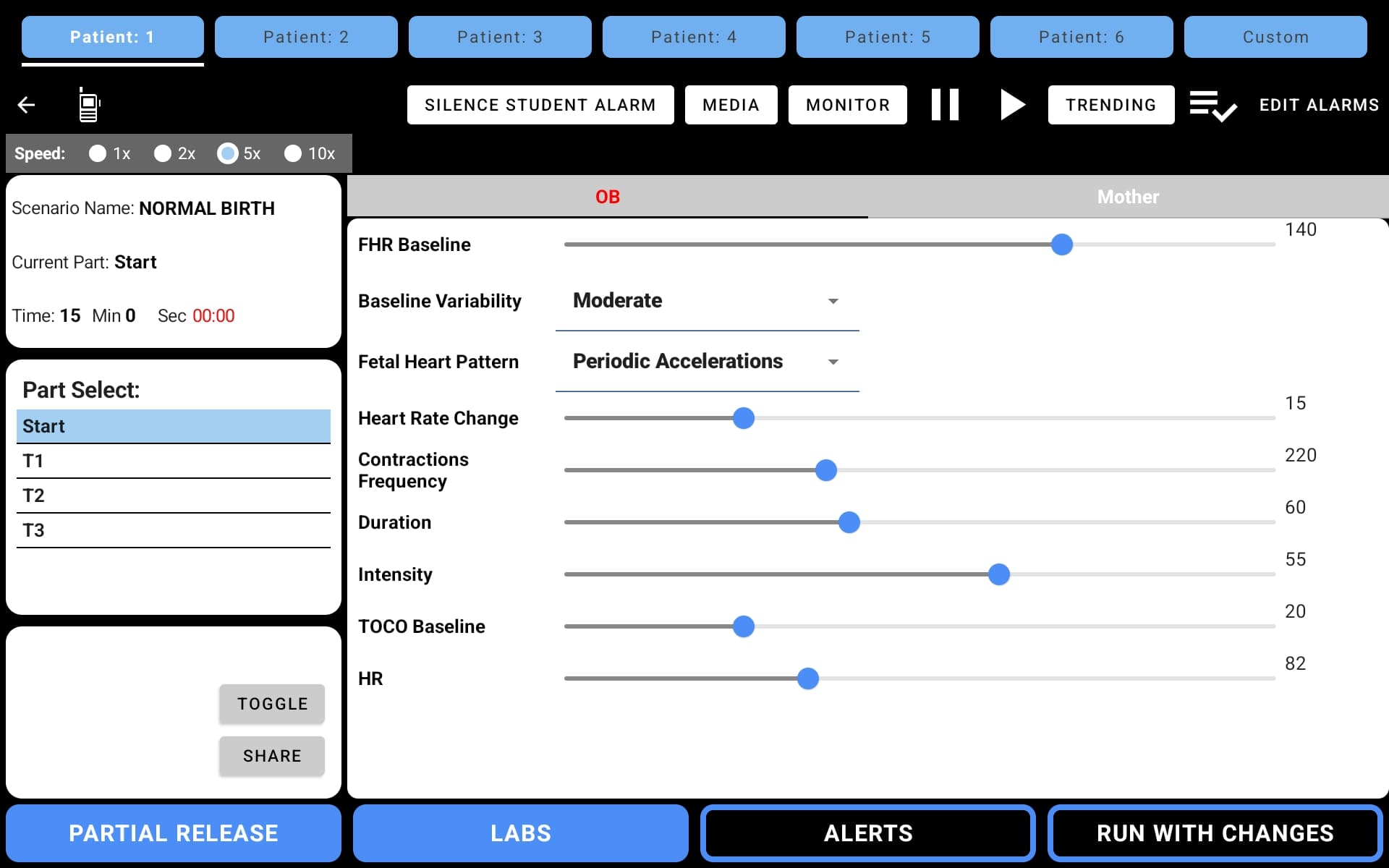
| Parameter | Description |
|---|---|
| FHR Baseline | Baseline fetal heart rate (bpm) |
| Baseline Variability | Absent, Minimal, Moderate, or Marked |
| Fetal Heart Pattern | Pattern type — Periodic Accelerations, Early Decelerations, Late Decelerations, Variable Decelerations, etc. |
| Heart Rate Change | Magnitude of accelerations/decelerations (bpm) |
| Contractions Frequency | Time between contractions (seconds) |
| Duration | Length of each contraction (seconds) |
| Intensity | Strength of contractions |
| TOCO Baseline | Baseline tocodynamometer reading |
| HR | Maternal heart rate |
Mother Tab
The Mother tab provides controls for maternal vital signs (HR, NIBP, SpO2, RR, Temperature) that display on the student's maternal vitals bar.
OB Scenarios
The fetal monitor includes OB-specific scenarios such as Normal Birth with pre-built parts (Start, T1, T2, T3) that progress through stages of labor with realistic FHR patterns and contraction changes.
Video Walkthroughs
Watch these short videos to see the Fetal Heart Monitor interface in action.
Student View Demo
A walkthrough of the student interface showing live FHR tracing and TOCO contraction updates during a simulation:
Instructor Controls Demo
How instructors configure fetal monitor parameters from the live simulation view:
Selecting the Fetal Monitor
On the student device, select Fetal Monitor from the "Select Monitor" dropdown before starting the simulation. On the instructor device, select a scenario from the Fetal Monitor category.