
Mechanical Ventilator
Guide to the Mechanical Ventilator interface — pressure, flow, and volume waveforms, ventilator parameters, and instructor controls.
The Mechanical Ventilator interface simulates a bedside ventilator display for respiratory therapy training. It features real-time pressure, flow, and volume waveforms alongside a full numeric parameters panel.
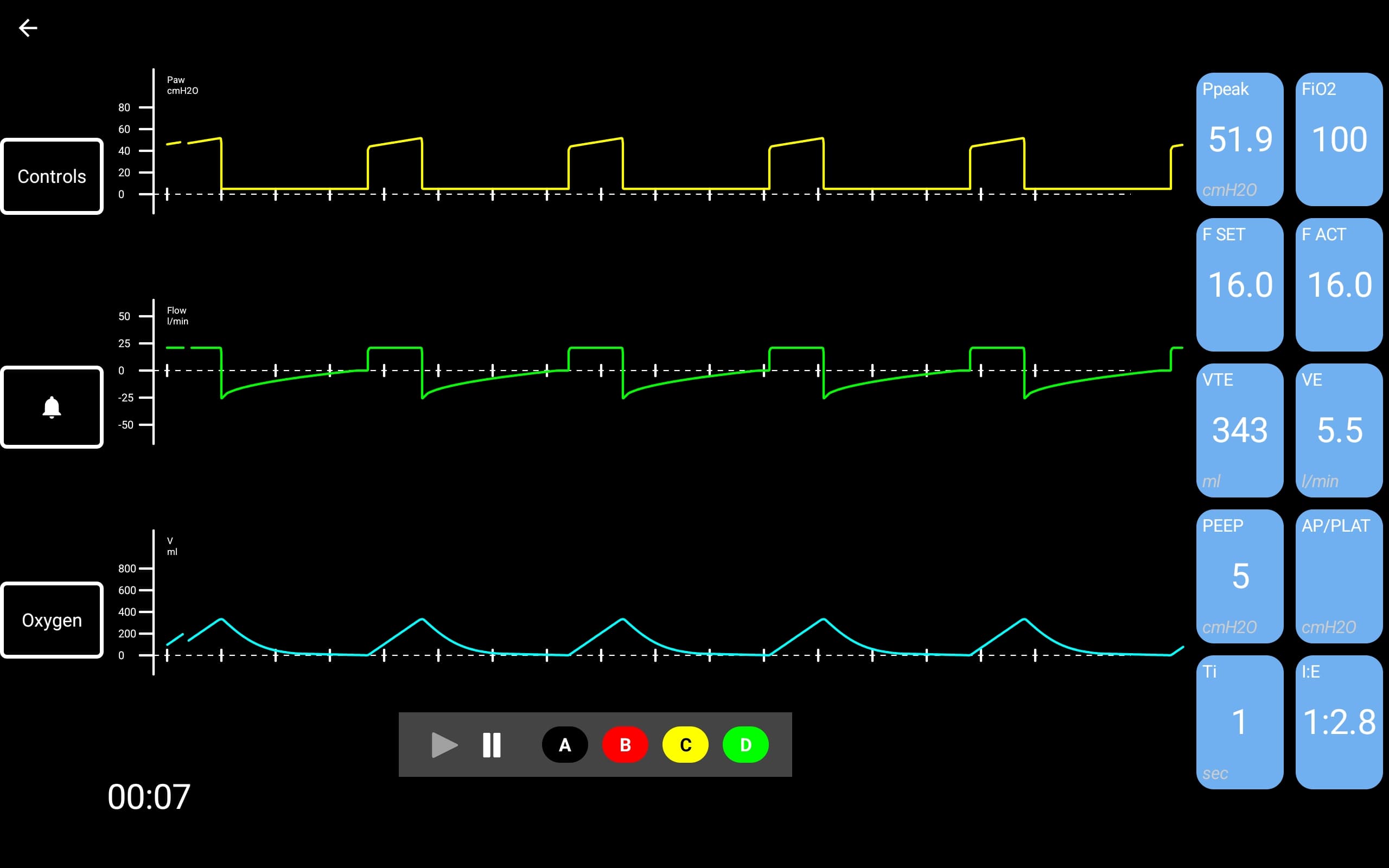
Interface Layout
The ventilator display is divided into several areas:
| Area | Description |
|---|---|
| Pressure waveform (Paw) | Top trace — airway pressure in cmH2O (yellow) |
| Flow waveform | Middle trace — inspiratory and expiratory flow in L/min (green) |
| Volume waveform (V) | Bottom trace — tidal volume in mL (cyan) |
| Parameters panel | Right side — numeric readouts for all ventilator parameters |
| Side buttons | Left side — Controls, Alarm (bell icon), and Oxygen buttons |
| Playback bar | Bottom center — play/pause and scenario part buttons (A, B, C, D) |
| Timer | Bottom-left — elapsed simulation time |
Parameters Panel
| Parameter | Unit | Description |
|---|---|---|
| Ppeak | cmH2O | Peak inspiratory pressure |
| FiO2 | % | Fraction of inspired oxygen |
| F SET | /min | Set respiratory rate |
| F ACT | /min | Actual respiratory rate |
| VTE | mL | Exhaled tidal volume |
| VE | L/min | Minute ventilation |
| PEEP | cmH2O | Positive end-expiratory pressure |
| AP/PLAT | cmH2O | Plateau pressure |
| Ti | sec | Inspiratory time |
| I:E | ratio | Inspiratory-to-expiratory ratio |
Waveform Traces
The ventilator displays three simultaneous waveform traces:
- Airway Pressure / Paw (yellow) — shows the pressure cycle during inspiration and expiration
- Flow (green) — shows inspiratory flow (positive) and expiratory flow (negative)
- Volume (cyan) — shows tidal volume delivery during each breath cycle
Instructor Controls
From the instructor's live simulation view, the Ventilator tab provides full control over ventilator parameters:
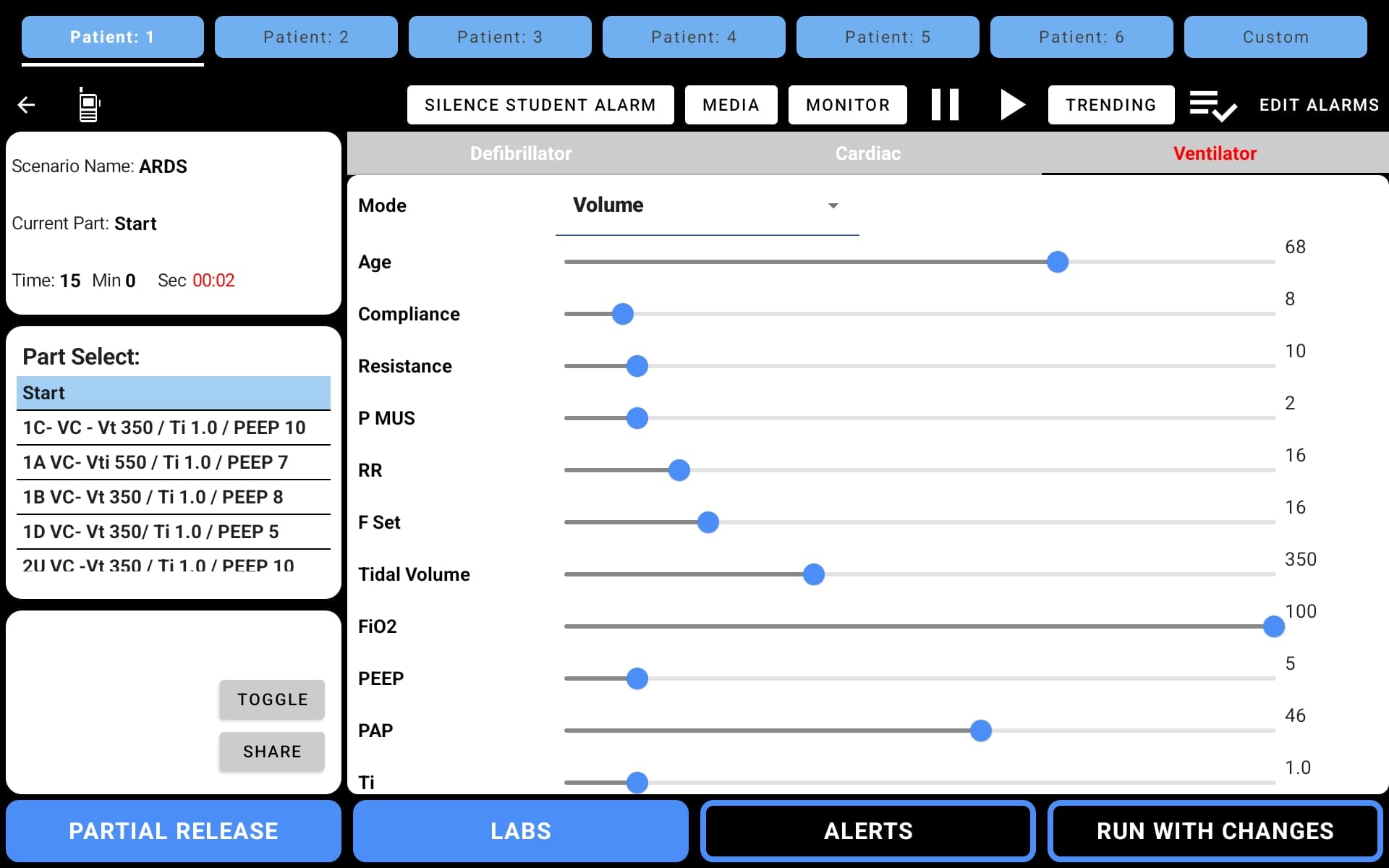
| Parameter | Description |
|---|---|
| Mode | Ventilation mode (Volume, Pressure, etc.) |
| Age | Patient age — affects compliance and resistance defaults |
| Compliance | Lung compliance |
| Resistance | Airway resistance |
| P MUS | Muscular pressure (patient effort) |
| RR | Respiratory rate |
| F Set | Set frequency |
| Tidal Volume | Target tidal volume (mL) |
| FiO2 | Fraction of inspired oxygen (%) |
| PEEP | Positive end-expiratory pressure (cmH2O) |
| PAP | Peak airway pressure |
| Ti | Inspiratory time (sec) |
The instructor can also access the Cardiac tab to adjust heart rate, blood pressure, SpO2, and other vitals that display on the student's monitor alongside the ventilator.
Respiratory Scenarios
The ventilator includes a dedicated Respiratory scenario library with conditions such as:
- ARDS
- Asthma
- Chest Trauma
- CHF
- COPD
- COVID
- Head Trauma
- MG (Myasthenia Gravis)
- OD (Overdose)
- Near Drowning
Each scenario includes pre-built parts with realistic ventilator settings that progress through the clinical course.
Selecting the Ventilator
On the student device, select Ventilator from the "Select Monitor" dropdown before starting the simulation. On the instructor device, select a scenario from the Respiratory category.
Video Walkthroughs
Watch these short videos to see the Mechanical Ventilator interface in action.
Student View Demo
A walkthrough of the student interface showing live waveform updates during a simulation:
Instructor Controls Demo
How instructors configure ventilator parameters from the live simulation view: