
Hospital Monitor
Guide to the Hospital Monitor interface — waveforms, vitals panel, toolbar functions, and alarm indicators.
The Hospital Monitor interface replicates a bedside patient monitor found in hospital settings. It features a full waveform display, numeric vitals panel, and a comprehensive toolbar for monitor configuration.
Instructor and Simulation Technician Deep Dive
For a complete instructor-and-learner walkthrough, including connections, scenario setup, vital signs and waveforms, media and X-rays, trending, partial release, and checklists, watch the full deep dive.
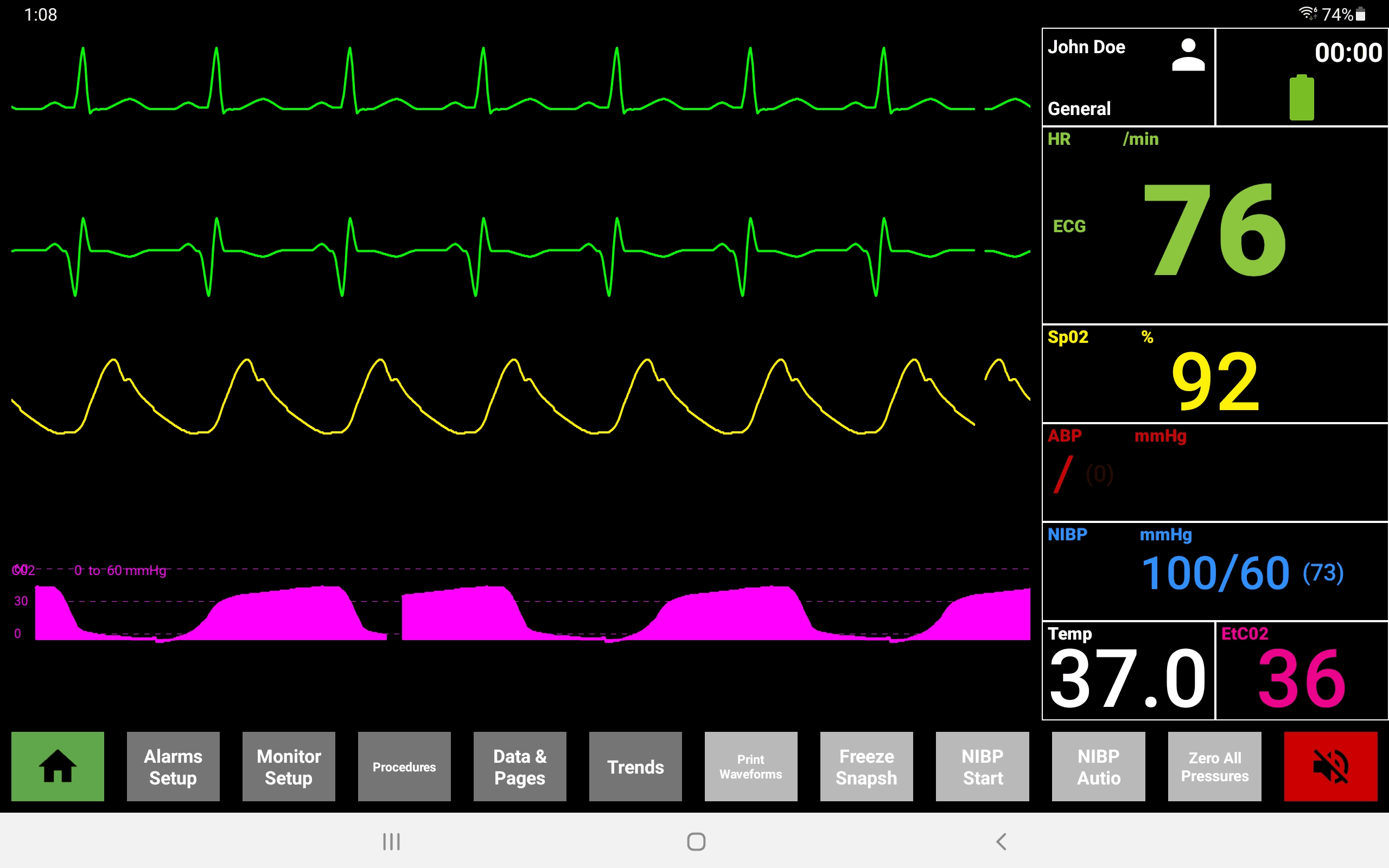
Interface Layout
The Hospital Monitor screen is divided into several areas:
| Area | Description |
|---|---|
| Waveform area | Full-screen waveforms — ECG (green), pleth/SpO2 (yellow/cyan), ABP (red), capnography (pink) |
| Patient info | Top-right shows patient name, care unit, and elapsed time |
| Vitals panel | Right side — numeric values for HR/ECG, SpO2, ABP, NIBP, Temp, and EtCO2 |
| Toolbar | Bottom row of function buttons |
| Alarm indicator | Bottom-right corner — flashes red when alarms are active |
Vitals Panel
| Parameter | Color | Unit |
|---|---|---|
| HR / ECG | Green | /min |
| SpO2 | Cyan | % |
| ABP | Red | mmHg |
| NIBP | Pink | mmHg (with MAP) |
| Temp | White | °C |
| EtCO2 | Yellow | mmHg |
Toolbar Controls
The bottom toolbar provides access to monitor functions:
| Button | Zone | Function |
|---|---|---|
| Home | A | Return to the main display |
| Alarms Setup | B | Configure alarm ranges for each parameter |
| Monitor Setup | C | Adjust display settings and waveform configuration |
| Procedures | — | Access procedure-related functions |
| Data & Pages | — | View data pages and parameter history |
| Trends | — | Open trend graphs for vital sign history |
| Print Waveforms | — | Capture and print current waveform strips |
| Freeze Snapshot | — | Freeze the current display for review |
| NIBP Start | — | Initiate a manual NIBP reading |
| NIBP Auto | — | Configure automatic NIBP cycling |
| Zero All Pressures | — | Zero all invasive pressure transducers |
| Alarm | D | Silence or acknowledge active alarms |
Waveform Traces
The monitor displays up to four simultaneous waveform traces:
- ECG (green) — cardiac electrical activity
- Plethysmography / SpO2 (yellow/cyan) — pulse oximetry waveform
- ABP (red) — arterial blood pressure waveform
- Capnography (pink) — CO2 waveform
Switching Displays
To switch between the Hospital Monitor and Defibrillator views, use the radio buttons at the bottom of the screen.